Renewal Date Decision Gates #
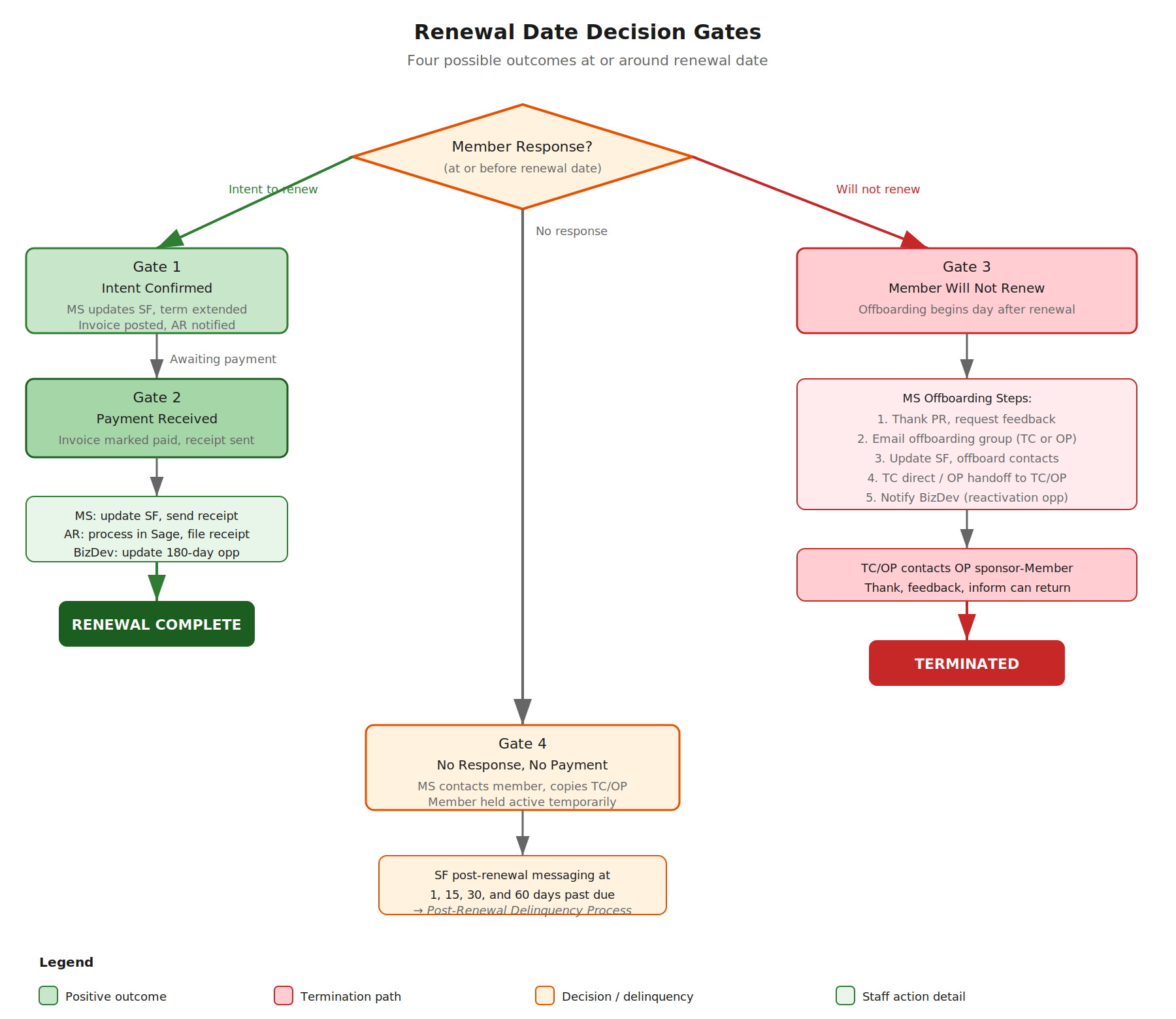
Gate 1: Member Confirms Intent to Renew #
Timing: Can occur at any time prior to or during the renewal process.
Actions: MS updates Member’s renewal status in Salesforce by checking the “has renewed” box on the subscription and clicking the ready for payment button which makes the Term extend by one year and the invoice post to Member’s Salesforce account. MS logs renewal intent to trigger payment reminder follow-up emails in place of renewal confirmation reminder emails.
AR posts invoice in accounting software to the month in which the member renews.
It is possible that a member might say that whey will pay, but they don’t pay right away.
Follow-up: MS and SF follow-up occurs until payment is received.
Gate 2: Payment Has Been Received #
Action: Member’s payment is received in full.
Result:
MS updates: The Member’s renewal status in Salesforce and the term extended by one year. The invoice is marked paid in SF and receipt is generated. SF then sends receipt link automatically to primary contact. MS also sends receipt messaging and PDF to primary contact and other requested contacts. MS updates the renewal spreadsheet and posts to the appropriate Slack channel for staff review.
Accounts Receivable: Processes the invoice in SAGE/accounting software and files cash receipt.
BizDev: Reviews and updates the 180-day outreach opportunity.
Note See Appendix A.
Gate 3: Member Indicates They Will Not Renew #
Timing: Off-boarding is set to begin the day after renewal date passes.
Note There are checklists on Github for onboarding and offboarding of Members.
MS Actions #
MS begins offboarding: #
- Sends email to PR thanking them for support, requesting feedback on reason for non-renewal, and informing them they can return at any time.
- Emails the appropriate offboarding group (offboarding-tc@oasis-open.org or offboarding-op@oasis-open.org) to trigger specific workflows.
- Updates the member’s SF record and begins offboarding for all contacts in SF.
- Processes TC offboarding directly; hands off OP offboarding to TC/OP.
- Notifies BizDev to add the account to the Customer Reactivation opportunity.
Note: #
(See Appendix A for proposed one-step offboarding action, and Appendix A for proposed automated alerts to TC/OP and TC Chairs on member deactivation.)
TC/OP Actions #
TC/OP contacts by email the OP sponsor-Member to thank them for support, asks for feedback on why they are not renewing, and informs them they can return at any time. MS is copied on this email.
Gate 4: No Response and No Payment to Renewal Messaging #
Action: MS contacts Member by email (with a copy to TC/OP), reminding the Member that they must confirm their intent to renew, and that payment is required to remain in good standing.
It is possile that a Member does not respond to the renewal messages, and we receive no payment from that Member.
SF sends post-renewal date messaging at 1, 15, 30, and 60 days past renewal date.
Purpose: To temporarily maintain Member in active status while OASIS pursues confirmation of renewal.